Day 7 - ⚡️ Quick - Pixel Coverage Calculations

Article / 08 May 2026

How to measure wasted UV space, and why it matters for alpha textures.

While writing a batch optimization script, I kept running into the same pattern. An asset with an alpha channel would have everything packed into a single material to save draw calls — but in practice, we were loading a full 2048×2048px albedo and alpha texture just to use 20% of it for the actual alpha-test pixels. With shaders you can split the work: an opaque shader handles the solid parts, an alpha-tested shader handles only the cutouts. But the texture itself still needs to be addressed.

The better approach is to pack the alpha parts separately into their own texture set and material. If there's very little alpha-tested geometry on an asset, you can potentially discard those polygons entirely over distance and skip the alpha texture sample altogether. And when memory gets tight, lower mips on alpha-tested materials degrade aggressively, blurring out detail fast.

The question is: how do you measure that waste, and what do you do about it?

Pixel Coverage

Capturing the alpha pixels that cover an asset tells us the number, or percentage, of pixels that are "wasted" within the UV shells or the texture overall.

By calculating the extent of the alpha texture actually used, we can make an informed decision: should the alpha cut or alpha blend mesh parts be packed separately, rather than loading a full 2K texture for a fraction of the content?

The Trade-off

Yes, separating the alpha parts into their own texture incurs an additional draw call and a unique shader. But the trade-offs work in your favor:

  • Lower LODs — the additional cost can be stripped from any LOD below the first, where alpha complexity rarely matters
  • Reuse — a small, generic alpha map can be shared across the project with a minimal memory footprint
  • Better quality — with a dedicated map, you can often increase the resolution of just that texture, improving alpha blend quality and mipmapping without the cost of upgrading the full 2K

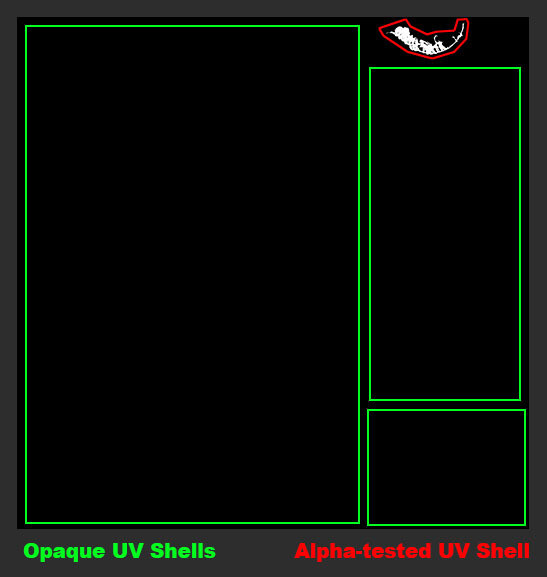
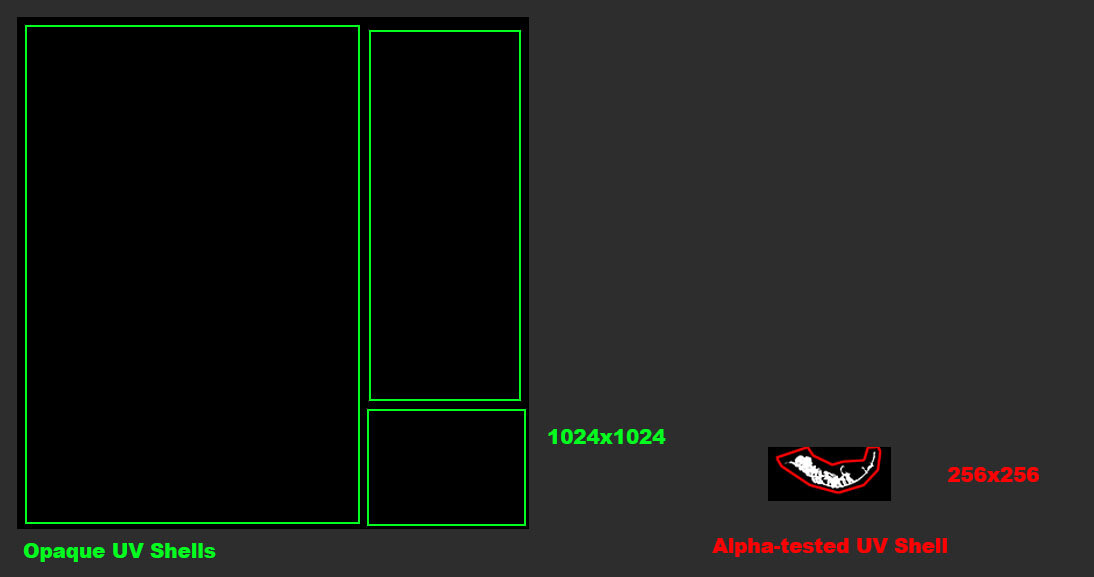
Example: An alpha cutout here occupies less than 15% of its texture — meaning most of what gets loaded is unused. The red outline indicates a UV shell. Within that shell, the formula above counts exactly how many pixels are actually used for alpha testing.

Ideal setup.

Formula

This function computes the UV coverage of a mesh; the fraction of texture space that is actually occupied by UV shells.

def CalculateUVCoverage(inMesh):
    areas = GetUVSurfaceAreas(inMesh)
    coverage = sum(areas)
    return coverage

A value close to 1 means the UV space is well packed. A value close to 0 means most of the texture is empty — wasted texel budget.

From there, I can go a step further and measure what fraction of those UV-covered pixels are actually doing alpha work. The key is to mask the opacity map against the UV shells first — if you use the opacity map directly, any padding or dilation bleeds outside the shells and returns a false result.

areas = GetUVSurfaceAreas(inMesh)    # 2D mask: white = UV shell, black = empty
opacity = LoadImage(inAlpha)          # opacity map: black = opaque, white = transparent
masked = areas * (1 - opacity)        # invert opacity so opaque pixels become 1, then mask to UV shells
alpha_coverage = sum(masked) / sum(areas)  # fraction of shell pixels actually used for alpha

In Practice

Is it always worth it? Maybe not for every asset. But collecting this data across a project is valuable — it reveals patterns, flags waste, and gives you something concrete to learn from going into the next project.

Run CalculateUVCoverage on any alpha-using asset during your pipeline validation pass. Flag anything below a coverage threshold (I use 30% as a starting point) and evaluate whether the alpha geometry is worth splitting into its own dedicated map. A small texture at the right resolution beats a large texture you're barely using.

New solutions are emerging for this problem too. Opacity Micromaps draw triangles based on your opacity map, reducing overdraw and simplifying ray-tracing meshes at the geometry level. It may be a while before these make their way into your engine, but it's worth keeping an eye on.

© 2026 Stefan Groenewoud — All views are my own, not those of my employer.
Day 5 - 💬 Take - The optimization conversation

Article / 06 May 2026

Optimization is treated as a problem-solving activity when it should be a planning activity. By the time someone raises a performance concern, the art is already built, the habits are already formed, and fixing it is expensive.

Timing Is Everything

Game development is often a balancing act; you need R&D first to figure out the style and direction of your project. I'm not saying teams should hyper-fixate on optimization at the expense of that process; that's the complete opposite of what I'm getting at. If pipelines are too early in their development, it's genuinely hard to optimize content because the foundation isn't ready yet. Shader optimizations are a good example of this. Setting up LODs, on the other hand, makes sense early in a traditional pipeline, as that work always has to be done regardless of where you are in production.

The moment optimization gets treated as something to deal with later, the cost of dealing with it compounds.

It's Rarely a Disaster, But It's Always a Tax

Contrary to what some might expect, I don't have horror stories. During each project there were challenges developing asset pipelines while tools weren't production-ready yet, which led to learning lessons along the way. That's normal. What's less normal, and worth flagging, is when performance issues get diagnosed too bluntly. Solely watching the performance graph and waiting for it to drop can give false positives. Lowering texture resolution will improve performance, but does it actually solve the underlying problem? Are you missing LODs, uncollapsed draw calls, unoptimized collision meshes? The number going up doesn't tell you that.

What It Looks Like in Practice

Some of the more concrete challenges I encountered: not having all content run through the optimized pipeline, which meant additional manual tweaks were still needed for far-distance LOD meshes. On a cross-platform title, not setting proper LOD distances early caused issues that were expensive to revisit. Skipping the first visual LOD incorrectly. And collision meshes with too many triangles, something with a real CPU cost. There was no hard limit defined for collision triangle counts; it was largely driven by artist experience and the assumption that larger on-screen assets required more accurate colliders. That's fair, but it still came at a cost that wasn't being tracked.

In my experience, most developers had a reasonable instinct around texture resolution — keeping maps at 2K, with 4K as a real exception reserved for cinematics, characters, or full-screen assets. That baseline consistency helped. The problems surfaced, on a different project, where consistency broke down across asset types: environment art with twice the texel density of characters, or assets with triple the average triangle count. The more content is authored without addressing this, the harder it becomes to course-correct later.

Conclusion

Performance matters, but it shouldn't hinder the creative process, and sometimes it does, driven by the loudest voices in the studio. Hyper-fixating on performance for performance's sake is not the way a team should approach it. It's a collaborative and iterative process that has to involve art direction, leads, and producers, so that everyone understands the constraints of the pipeline — and how scalable, or not scalable, it actually is.

This is as much a leadership problem as it is a technical one. The conversation doesn't need to be a blocker; it needs to be on the agenda.

© 2026 Stefan Groenewoud — All views are my own, not those of my employer.
Day 3 - 🔬 Deep dive - Occluder Meshes

Article / 04 May 2026

Occluder Meshes

A companion to Shadow Proxies — another manual mesh optimization technique that helps the engine discard work it doesn't need to do.

Purpose

As shaders become more complex and heavier, optimization becomes more important. If a shader doesn't write to the depth pass, it won't contribute to the pre-pass that culls unnecessary pixels further down the pipeline.

Systems like backface culling (which discards triangles facing away from the camera) or occlusion culling middleware like Umbra handle some of this automatically, but they don't take care of the pixel shader cost for geometry that's technically "in view" but hidden behind something else.

By creating a custom occluder mesh that writes to the depth buffer, you're helping the Z-prepass cull pixels that are definitely not visible from a given angle. The key constraint: all triangles of the occluder mesh must stay within the bounds of the visual mesh. If the occluder extends beyond the visual geometry, it will incorrectly kill pixel shader information behind it, causing rendering artifacts where visible pixels get culled.

Maximum draw distance is also worth considering. If an occluder mesh is too aggressive at large distances, it can cause issues due to reduced vertex precision over distance; depth buffers become less precise at far ranges because of how depth is distributed non-linearly (more precision near the camera, less far away). An overly tight occluder at distance can start incorrectly culling pixels that should be visible.

Rule of thumb: I tend to target walls or props that cover most of a character's body, or roughly 10–15% of the screen, at least for third-person games. Anything smaller and the occluder drawcall costs more than it saves.

Engine Support

Unreal Engine does support custom occluder meshes. In UE4 and UE5, you can enable Software Occlusion Culling and mark specific simplified meshes as occluders. UE5 also handles much of this automatically through Nanite's software rasterizer for opaque geometry, but for non-Nanite assets and translucent materials, custom occluders remain relevant.

Note: not all engines support this level of per-asset control. Some proprietary engines expose it explicitly, others handle occlusion at a higher level with less artist input.

When It Helps

  • Large opaque props that block a meaningful portion of the screen.
  • Interior walls, pillars, architectural elements in dense scenes.
  • Non-Nanite assets in a UE5 pipeline.

When It Doesn't

  • Small props: the occluder drawcall will cost more than it saves.
  • Translucent or alpha-blended geometry: these don't write to depth and can't act as occluders.
  • Nanite-enabled opaque geometry in UE5: Nanite handles this automatically.

© 2026 Stefan Groenewoud — All views are my own, not those of my employer.

Day 2 - ⚡️ Quick - Backface vs Occlusion Culling

Article / 01 May 2026

Backface Culling vs Occlusion Culling — What's the Difference?

Front-/Backface culling is done at the hardware level; the GPU determines the winding order of a triangle (clockwise vs. counter-clockwise relative to the camera). If it's back-facing, the triangle is discarded before the pixel shader runs.

There are cases where you'll need to disable it, for example two-sided materials like foliage cards, thin fabric, or leaves need both faces to be visible, and transparent geometry such as glass often requires interior faces to render correctly, so the volume reads right. Fast, cheap, and on by default for opaque geometry.

Occlusion culling happens at a higher level, before draw calls are even submitted. It determines whether an object is hidden behind something else; if it is, the engine won't queue the draw call at all. This works well for opaque assets.

Alpha-tested and alpha-blended materials are trickier: because they don't fully write to the depth buffer, they can't reliably act as occluders themselves. Some engines handle the occlusion pass automatically with tools like Umbra, or through built-in Software Occlusion Culling like UE. But you can also manually help the engine by creating custom occluder meshes, which is what tomorrow's post covers.

Key difference: backface culling happens at the triangle level and removes back-facing triangles. Occlusion culling happens at the object/draw call level and skips rendering hidden assets entirely.

© 2026 Stefan Groenewoud — All views are my own, not those of my employer.

Day 1 - 🔬 Deep dive - Shadow Proxies

Article / 30 April 2026

Shadow LODs were a manual optimization technique for reducing shadow rendering cost. With modern rendering tech like Nanite and Micromesh, they're largely obsolete, but not entirely.

Back in the day

When I just entered the industry I only played around with Visual LODs, which was already challenging enough at times if you had to manually generate them. Any normal, UV or vertex inconsistencies were quite noticeable, and not all studios used automated tools. So for some of the games that I worked on, we manually reduced meshes inside Maya, and then did manual tweaks to polish. Nowadays, we have fancy tools like Simplygon or default to using Nanite-like techniques.

The Old Problem

First, we had offline baking processes that would take care of the heavy lifting. In preparation for that, you needed UVs on your mesh, and then generate a secondary UV set that was a complete unique layout for lightmap generation. Problem: every time an asset changed or if you updated the Time of Day, you had to rebake the level; slow and tedious as you can imagine! The industry responded on two fronts: light probes (storing irradiance as spherical harmonics coefficients) let dynamic objects receive indirect lighting without triggering a full rebake, and the shift to deferred rendering separated the geometry and lighting passes, enabling more dynamic lights without a proportional performance cost.

The more complex and dense assets became, as games increased in scale (more open world games), and the more dynamic worlds have to become, the harder it is to solely rely on the visual LOD also affecting the shadow maps and/or shadow cascades. The shadow depth pass has to evaluate every triangle in a mesh — or worse, every pixel for alpha cutouts, and that cost adds up fast. The solution was a shadow proxy: strip away the visual shader entirely and substitute a separate, ultra-simplified mesh used only for shadow casting, while the full-detail mesh handles visible rendering.

Great example from CryEngine where they demonstrate the reduction from 10k triangles to just 1k triangles. Visually the difference is barely noticeable to the naked eye but performance-wise it will have an impact.

You don't need normal or albedo information in a shadow proxy shader. If you require displacement or alpha-testing for your visual shader, you'll want to integrate those into your shadow proxy shader too, for parity. From an organizational and performance point of view, you want to separate your opaque vs. alpha-tested materials, keeping the number of alpha-tested triangles/pixels to a minimum and not drawing them for the entire mesh if you don't have to.

For visual LODs you can swap out different simplified meshes at predefined draw distance thresholds; the same can be done for shadow proxies. Having a reduced shadow proxy at far distances will also help reduce load on shadow memory. Note: the visual mesh threshold doesn't need to match the shadow proxy threshold. For example, a shadow proxy can draw at a maximum distance of 200 metres while the last visual LOD draws at 500 metres. Shadows at just a few pixels may not be noticeable, but the visual representation still is.

To sum up:

  • Use a custom proxy mesh that only writes to the shadow cascades
  • Assign a dedicated shadow proxy shader; strip any information that isn't needed in this stage of the pipeline
  • Set custom draw distances independent of your visual LOD thresholds

Limitations

The statement "no longer necessary with Nanite" is the right instinct, but it's only fully true for opaque Nanite geometry. Foliage and Characters still remain challenged by custom shadow proxies.
Shadow Physics Asset still useful for Characters. While Foliage needs an alpha-tested fallback option.

How It Worked in Unreal Engine & Proprietary

UE3 / UE4 / Others:

You could assign a simplified static mesh exclusively for shadow casting in a few ways:

  • A dedicated low-poly mesh component with rendering disabled and shadow casting enabled, using a convex hull or box mesh casting the shadow instead of the real geometry
  • For alpha-heavy assets (foliage, fences, chains), this eliminated the expensive per-pixel shadow depth evaluation on alpha cutout materials
  • Per-LOD shadow control: disable shadow casting on lower LODs entirely, or force a simpler shadow representation per LOD level

UE5 / Nanite:

Nanite handles shadow depth passes through its own rasterizer with automatic LOD, which largely removes the need to hand-author shadow proxies for high-poly opaque meshes.

However, Nanite doesn't fully support alpha masked geometry. Alpha-heavy assets still fall back to traditional shadow rendering, which means the proxy technique remains relevant for:

  • Foliage with alpha cutouts
  • Fences, railings, chains, cables
  • Any non-Nanite mesh in a Nanite pipeline

Practical Takeaway

If your project uses Nanite for hero assets, shadow LODs are off your plate for those. But keep the proxy approach in your toolkit for anything with alpha transparency or anything outside the Nanite pipeline. A box mesh shadow proxy on a dense foliage card cluster is still a meaningful win.

© 2026 Stefan Groenewoud — All views are my own, not those of my employer.

Day 0 - 💬 Announcement post - why I'm doing this, what to expect

Article / 29 April 2026

I'm Back — And This Time I'm Actually Going to Post

It's been a while since I've written anything here. Longer than I'd like to admit.

Coming back to the blog is partly an exercise in figuring out where I want to go next in my career: what areas of tech-art I still want to explore, what I've learned that's worth sharing, and honestly, what I still don't fully understand yet. Writing has always been a good way for me to work that out.

The other reason is simpler: my old approach wasn't working. Some of my posts took several evenings to get through: writing, rewriting, proofreading, trying to make everything perfect before hitting publish. It was too slow and too draining to keep up. I'd rather post something good every day than something perfect every six months.

So this is an experiment. For the next 60 working days, I'm going to post something every weekday. The posts will vary: deep dives, quick breakdowns, behind-the-process writeups, opinions, experiments. Some will be long. Some will be short. Not all of them will be great, and that's fine.

If it gains traction, great. If not, I'll still have sharpened my writing, figured out which formats actually suit me, and gotten a lot of ideas out of my head and into the world.

Let's see how it goes.

© 2026 Stefan Groenewoud — All views are my own, not those of my employer.