How to measure wasted UV space, and why it matters for alpha textures.
While writing a batch optimization script, I kept running into the same pattern. An asset with an alpha channel would have everything packed into a single material to save draw calls — but in practice, we were loading a full 2048×2048px albedo and alpha texture just to use 20% of it for the actual alpha-test pixels. With shaders you can split the work: an opaque shader handles the solid parts, an alpha-tested shader handles only the cutouts. But the texture itself still needs to be addressed.
The better approach is to pack the alpha parts separately into their own texture set and material. If there's very little alpha-tested geometry on an asset, you can potentially discard those polygons entirely over distance and skip the alpha texture sample altogether. And when memory gets tight, lower mips on alpha-tested materials degrade aggressively, blurring out detail fast.
The question is: how do you measure that waste, and what do you do about it?
Pixel Coverage
Capturing the alpha pixels that cover an asset tells us the number, or percentage, of pixels that are "wasted" within the UV shells or the texture overall.
By calculating the extent of the alpha texture actually used, we can make an informed decision: should the alpha cut or alpha blend mesh parts be packed separately, rather than loading a full 2K texture for a fraction of the content?
The Trade-off
Yes, separating the alpha parts into their own texture incurs an additional draw call and a unique shader. But the trade-offs work in your favor:
- Lower LODs — the additional cost can be stripped from any LOD below the first, where alpha complexity rarely matters
- Reuse — a small, generic alpha map can be shared across the project with a minimal memory footprint
- Better quality — with a dedicated map, you can often increase the resolution of just that texture, improving alpha blend quality and mipmapping without the cost of upgrading the full 2K
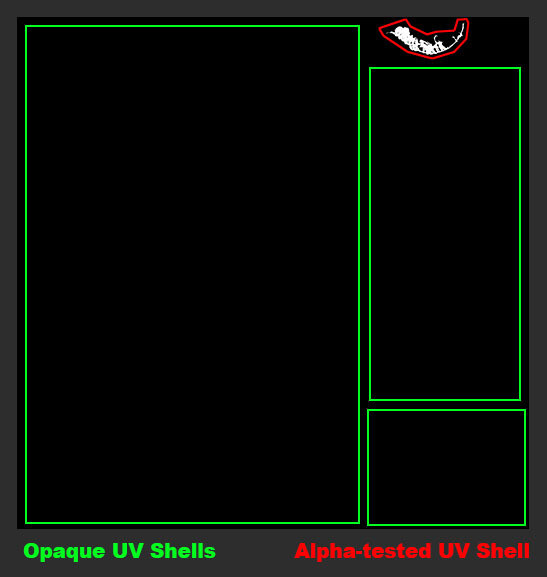
Example: An alpha cutout here occupies less than 15% of its texture — meaning most of what gets loaded is unused. The red outline indicates a UV shell. Within that shell, the formula above counts exactly how many pixels are actually used for alpha testing.
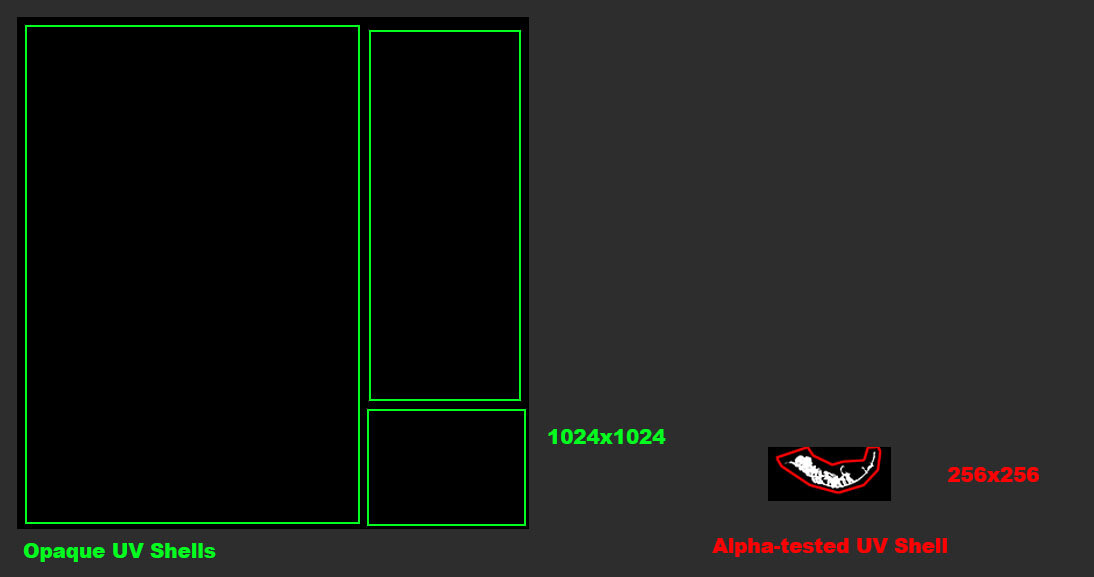
Ideal setup.
Formula
This function computes the UV coverage of a mesh; the fraction of texture space that is actually occupied by UV shells.
def CalculateUVCoverage(inMesh):
    areas = GetUVSurfaceAreas(inMesh)
    coverage = sum(areas)
    return coverage
A value close to 1 means the UV space is well packed. A value close to 0 means most of the texture is empty — wasted texel budget.
From there, I can go a step further and measure what fraction of those UV-covered pixels are actually doing alpha work. The key is to mask the opacity map against the UV shells first — if you use the opacity map directly, any padding or dilation bleeds outside the shells and returns a false result.
areas = GetUVSurfaceAreas(inMesh)    # 2D mask: white = UV shell, black = empty
opacity = LoadImage(inAlpha)          # opacity map: black = opaque, white = transparent
masked = areas * (1 - opacity)        # invert opacity so opaque pixels become 1, then mask to UV shells
alpha_coverage = sum(masked) / sum(areas)  # fraction of shell pixels actually used for alpha
In Practice
Is it always worth it? Maybe not for every asset. But collecting this data across a project is valuable — it reveals patterns, flags waste, and gives you something concrete to learn from going into the next project.
Run CalculateUVCoverage on any alpha-using asset during your pipeline validation pass. Flag anything below a coverage threshold (I use 30% as a starting point) and evaluate whether the alpha geometry is worth splitting into its own dedicated map. A small texture at the right resolution beats a large texture you're barely using.

New solutions are emerging for this problem too. Opacity Micromaps draw triangles based on your opacity map, reducing overdraw and simplifying ray-tracing meshes at the geometry level. It may be a while before these make their way into your engine, but it's worth keeping an eye on.
© 2026 Stefan Groenewoud — All views are my own, not those of my employer.