Interview with a Material Artist

General / 24 May 2022

This year I have been almost 10 years in the games industry and wanted to share my ideas and answer questions that I have gotten over the years but didn't get to answer. Hopefully my blogpost will inspire you and help you find your way within the industry or maybe even help you find your niche?
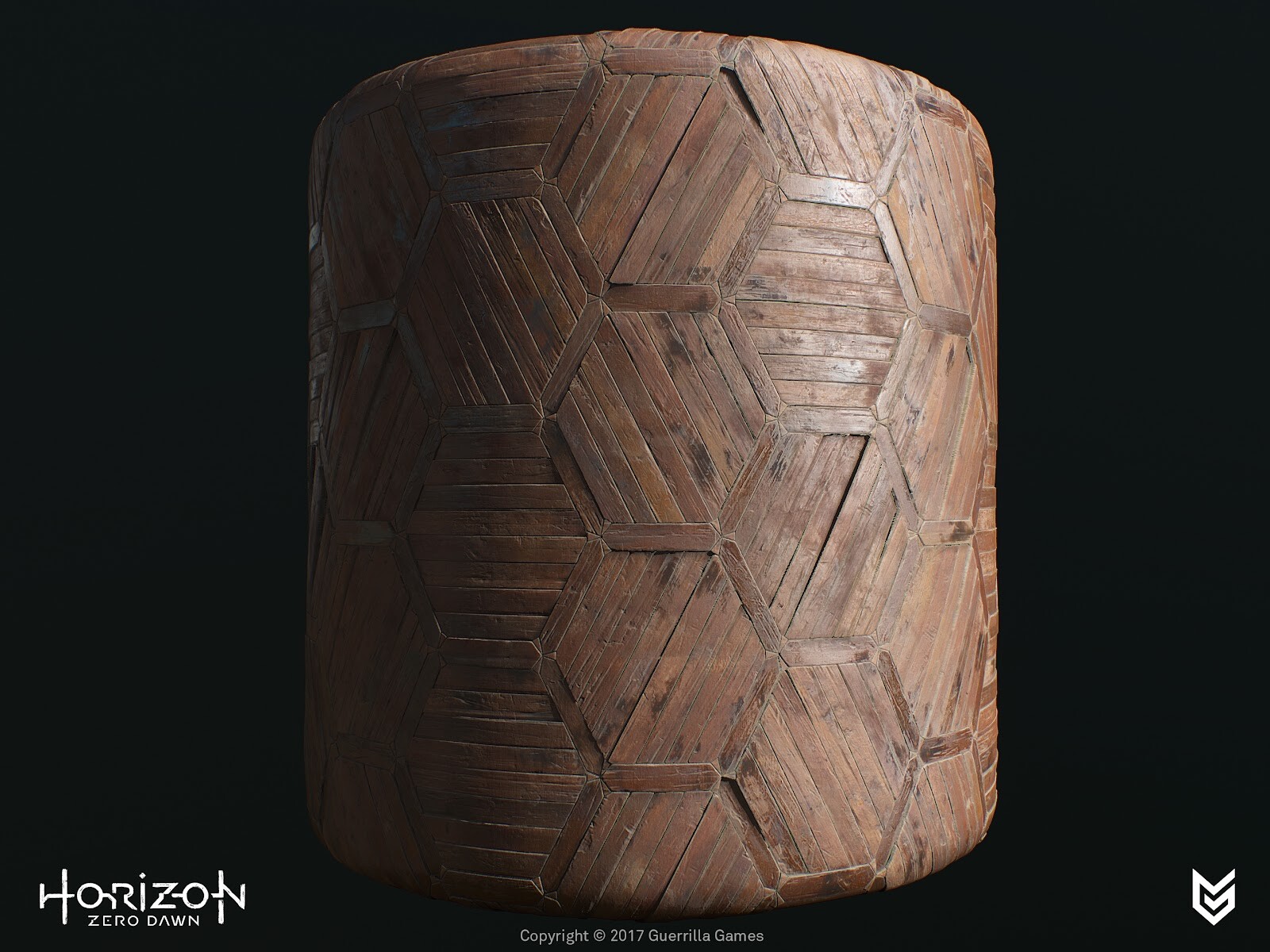
How did you get into such a cool IP as Horizon? What sort of brought you in this direction?
Back in 2012 I was already an intern at the studio, a couple of years before I rejoined in 2014, however during my internship I did see some early concept art for this new IP now called Horizon. When I was about to join the team I didn't know for sure which project I'd be working on but, as you can imagine, I had my suspicions. Back then I was mostly working on assets or environment-art but was also looking into creating shaders and material expressions. This technical interest landed me the shader/texture artist position and started delving deeper into this area of expertise over the last couple of years.


What was your general approach to assets in this production? You’ve had quite a tricky task, building all those amazing materials. How did you decide to tackle this?
During the concept phase there were already a whole lot of reference images available (collected by our talented Concept-Artist and Directors) but also my Art-Director had specifications of what he was looking for. The target was to blend this look from the proposed Concept Art and the requirements of the Environment-team/Art-Director(s) and of course I had my own input. From these reference images I have created a huge reference sheet with everything I found interesting per image and from there we picked and chose which characteristics we liked and added callouts to highlight what we felt was necessary to sell the idea of the materials. This really helps to get everyone on board with the exact look we were going for.For any artist I'd suggest; always try to collect images to build your own material library, this can be Pinterest or snapshots on holiday. I do this and then after one or two years, I delete everything and refresh my entire collection.
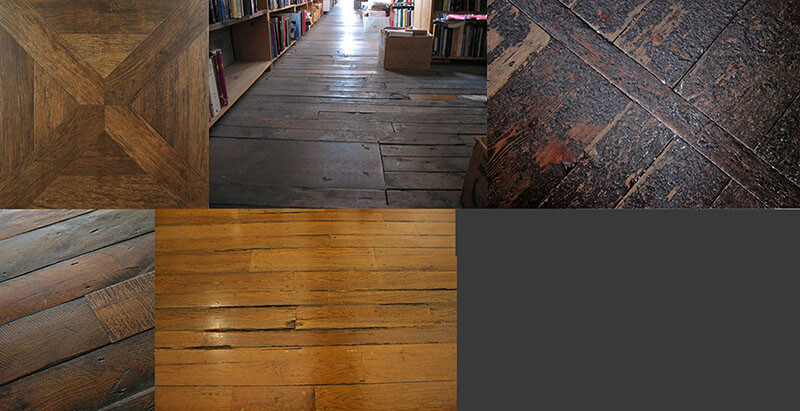
Ref images
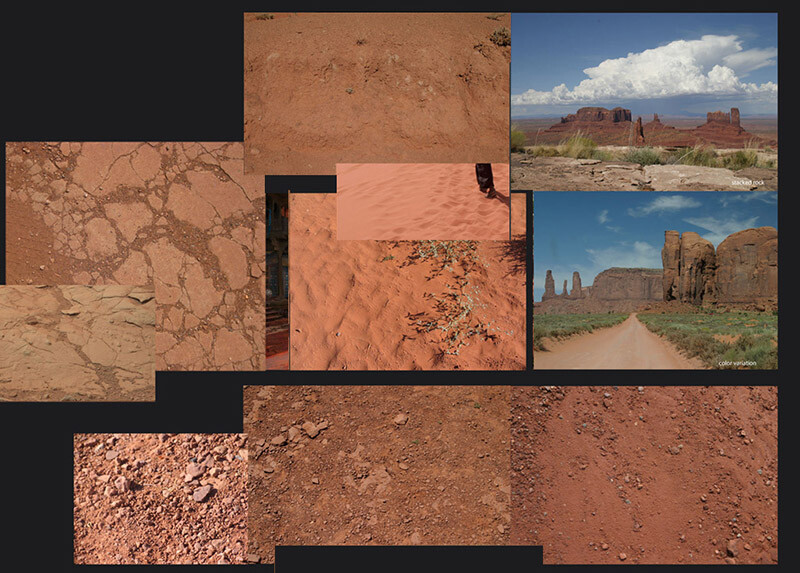
Ref images


You were using Photoshop and ZBrush to craft all those amazing textures. Could you talk in more detail how it all worked?
During the development of previous projects we worked with high poly sculpts in Zbrush to generate detailed heightmap information from those. But when we started implementing Substance with a few textures to get a feel of the program and its workflow. For example with a gravel texture, we generated tiny pebbles and added multiple stacks with offsets and a variety of scaling to make it look more interesting and finalize it with some photo overlays and color correction in Photoshop. 

No matter which program or tool we used, we always focused on getting the height information correct first, before diving into the Color and Roughness values too much. For some textures it felt more comfortable to generate the content in Zbrush as it gave me complete control per brick (or had to match with pre-existing assets/models), I was able to put each brick at an angle or give it height differences to give it some nice parallaxing effect. The downside was: it’s very time consuming. For texturing the albedo/diffuse we tried several approaches, for example: polypainting the bricks in zbrush but we had to keep such a high polycount that Zbrush became unworkable and too little poly density would result in a lack of detail. Then we used Photoshop but now that Substance expanded their libraries a lot is possible now, that wasn't before. I would've picked up a hybrid approach, generated high poly mesh and generated the diffuse and roughness in Substance.


You’ve mentioned that you choose Photoshop because of more control over the subtleties in color/height variation. Why was this more important to you? I mean you could have gotten very similar results Procedurally.
In hindsight I probably could have pulled off a similar result. As the height information was the most important to me, it really sold the textural details and state of the bricks and ultimately sold the believability of the material. In the reference images that were collected, it showed me the importance of all the states of decay that were having subtle tonal variety and height values.

Timelapse of focusing on the height information first.Before adding diffuse/roughness.


How did you make these materials tile in such a beautiful manner? Did you use some other tools to scatter the rocks here and other little things?

With a bit of planning and proper mesh setup, you can easily offset your subtools and align them so it’s tiling perfectly (especially now with Substance Designer in our arsenal). Getting the scale right versus the right amount of detail and uniqueness is tricky. Each brick was placed as a unique subtool, so it could easily get warped and moved around. We iterated many times on the brick layout to get the right feel before we proceeded with the Diffuse/Albedo/Roughness maps.

The scattering of rocks was a combination with custom Maya scripts where I could scatter kitbashed rocks or in Substance Designer. Scattering rocks with photo scanned data was interesting to familiarize yourself with generating procedural content and also match it with pre-existing photoreal content.


You’ve done some absolutely stunning work with the brick wall. It’s like the most favorite subject of every texture artist, but your material is something else. Can you tell us, how did you manage to build it in such a way that the brick wall actually has information about 3 types of bricks: old, worn down and new. 

Planning was very essential for this to succeed. First we started blocking out the intact version of the bricks and tested the look and feel of the layout in-game. We checked for scale, height variation, repeating elements - even a flat color in the albedo with some curvature and ambient occlusion information can help a lot visually to give a feel of the surface and readability over distance.

I then reworked the high poly sculpt and baked out maps for the first pass - I grab all the baked maps, e.g. Position to World Space Normals, custom mat caps in Zbrush. This gives me a wide variety of masking methods I can pick and choose from to create the tonal variety. Blending the Curvature map with the Position map and a random (brick) variation mask, created interesting variations. Next step is to apply more colors by adding photos, mask out bricks based on height or manually select them, add tonal gradients with the HSL slider/node for per brick subtle variations.

For the second material we used the exact same layout in Zbrush and started to replace bricks of the same size or used the well known Dam standard brush or Orb Crack brush combined with a custom alpha mask to split up the bricks or use the TrimSmoothBorder brush to soften the edges (as worn brick does over time). On certain bricks we would add some alpha stamps to make the brick look more damaged. Or by moving some bricks even lower and skewed which emphasized the aging process even more.


How did they help you to nail that beautiful hard surface stuff?

Maarten (Art Director) and I were looking for a way to speed up the texturing process but also maintain the quality that was pushed throughout the game. The two of us decided to delve deeper into the Substance packages and set up custom nodes and materials which also extended our internal Substance library. During this iteration process of creating nodes and testing them, we created a smart material that we could apply to almost all the assets. In 90% of the cases it would get us there and in some cases there were some tweaks needed but it sped up the art creation process quite a lot. Between the two of us we managed to export 45-ish component sets within two days with all the latest smart materials updated and correct masking for detail maps.


How did you work on those wonderful rusty elements in the production? How were these set up? What were the challenges in these assets?

The rusty element was an iterative process of creating custom Substance nodes. First, we started making generic materials with some light wear, tear and discoloration. In the second iteration, we started adding things like dust, dirt and rust. To get the realism we were looking for, we worked on custom mask generators, e.g. rust got stored into its own user-channel, which took Ambient Occlusion and Curvature in mind. With an additional custom node, we can generate streaks based on the rust mask user-channel, this gives us the drips and very long streaks.


Over all, to finalize, how did these materials help to tell the story in the environment? Why do you think they are even important for these humongous productions?

Material expressions are supposed to give the player the idea that they are in a believable world, that it becomes almost tangible. If a material looks ‘off’ it will break that illusion and snap the player right out of the immersion. The materials will tell the story the world is being lived in, it shows age and beauty. But also the interaction between materials, how water affects wood or metal for example or what erosion does to rocks or bricks. No matter how large the production environment is, you can do this kind of environmental storytelling in all sorts of ways.


Day 30 - 💬 Take - Automation

General / 11 June 2026

Automation is great for redundant processes and ensuring consistency. But there's a right time and a wrong time to reach for it.

I want to share some thoughts and past experiences on automating processes, specifically where I've seen it go wrong and what I've learned from it.


Why Consistency Matters

The fewer one-off cases and derivatives a pipeline needs, the more scalable it is. Consistency leads to predictable outcomes and predictable memory usage. I've seen this proven in shader development; fewer permutations mean less complexity to manage, lower compile times, and a more stable pipeline overall.

result of the tool I wrote to batch swap shaders and update their textures.


Too Much Too Soon

That said, I see too many developers reaching for automation before the pipeline is actually ready for it.

The order matters: first, you need to understand and fully define the pipeline you're trying to streamline. Only then can you figure out how to get there: how much time the code will actually take, how to break it into manageable pieces, and what the edge cases are. I get it, I'm also eager to start writing code. But on a professional project, that instinct can cost you. The more you understand upfront, the less code you'll end up throwing away.

This also requires alignment. Having a shared understanding with your peers and tech directors before you start building is important; otherwise you risk building something that doesn't serve anyone and quietly gets abandoned.

Nobody likes throwing away work, and companies especially don't. The problem with automating too early is that people get precious about a tool once it's been delivered. When that tool eventually needs reworking, the reaction becomes "but we just built that", creating friction that makes it harder to do the right thing. Sometimes you have to bite the bullet anyway. If you don't, you end up carrying tech debt: a tool that's half-baked, a workflow that's awkward, and a shipping schedule that keeps you stuck with both.


Conclusion

Automation itself isn't the problem; the sequence is. Build consistency into the pipeline first, get the team aligned, then write the code. The pipeline definition is the hard part; the code follows from it. The question worth asking before you start isn't "can we automate this?"; it's "do we understand this well enough to automate it?".

© 2026 Stefan Groenewoud - All views are my own, not those of my employer.

Day 29 - 🔬 Deep dive - Surfacing Pipeline End to End

General / 10 June 2026

Surfacing is everything between a finished model and a validated asset in-engine - and a repeatable pipeline beats per-asset improvisation every time.


What "Surfacing" Actually Means

Ask three studios what "surfacing" means and you'll get three different answers. At one studio it's purely the artistic side: developing materials. At another it includes the technical side too: figuring out which textures need to be created and where they go, running performance tests, setting up the pipeline itself. At others, a programmer handles all the foundational setup and the artist never touches it.

Both models have pros and cons. When the technical side is handled for you, you can focus entirely on the craft but you never get the full picture of what your data is doing, how it's being applied, and it usually means less artistic freedom with the shader: most likely you get handed a black box, built around performance first. It's also why the job is hard to explain when applying elsewhere, the title stays the same, but the expectations shift completely per company.

For this post, surfacing covers the whole span: from reference gathering through authoring, packing, engine setup, and optimization, ending at a validated asset in-engine. That's deliberately wider than "just texturing", texturing is one stage in the middle of it.

This is how I've seen it work across studios and conversations with others in the industry - your mileage may vary.


Inputs and Prerequisites

A shader can't fix what arrives broken. Before you can start authoring, a few things have to be true: clean topology, non-overlapping UVs; an agreed texel density target (coming in one of the future blogposts); a naming convention everyone follows; and reference gathered and approved by art direction. Each of these is cheap to enforce at intake and expensive to fix after twenty or more assets are built.

As an example: I once had an asset where messed-up topology and wonky normals propagated into the bakes, making the curvature read far too extreme and throwing off other features in the shader. It made the real problems hard to see through the noise - a perfect example of a broken input that no later stage could hide.


Reference and Calibration

I've covered the why in Day 11 - 💡 Insight - Why Photo Reference Changes Everything and the how in Day 14 - ⚡️ Quick - Using Gloss Meters for Surface Measurement. In the pipeline, what matters is the when: values and gloss get locked (ideally) before authoring starts, not adjusted afterward to taste. These decisions also depend on where you actually settle with the art style, but the sooner you can lock down the rules, the less you have to keep iterating on assets. If calibration lands when you're already a few assets in, those assets need to be reprocessed to bring them back into the correct ranges.

Calibration also needs a where and a who. The where is a neutral, controlled lighting scene in-engine: PBR standardizes the physics, but every engine has its own roughness curve and tone mapping quirks, so values that look right in Substance can read different when rendered in engine. The who is art direction: a value isn't calibrated because it looks right to you; it's calibrated when it's signed off and becomes a rule the rest of the pipeline can trust.


Material Authoring

The core authoring stage and the one I've written about most, so I'll keep it to the pipeline view: the approach in Day 6 - 🛠️ Behind the process - Approaching Material Creation, the library structure in Day 12 - 🛠️ Behind the process - Building a Material Library. The pipeline question at this stage is reusable vs. bespoke: does this asset pull from the shared library (fast, consistent, one point of update) or does it justify bespoke work (hero assets, unique storytelling surfaces)? The ratio between those two is a budget decision, not an artistic one.

Do you need full texture bake-downs, or can it be composited in-engine? Compositing gives you more flexibility in propagating changes from the material library, but less room for bespoke details or storytelling - things will look a bit more generic, but consistent across the board. My preference is to first build the base materials that will dictate 70-80% of the materials you expect to see in your game; you can still reference those in Painter or Designer when texturing your bespoke bakes, or simply use them directly as composited materials in-engine.

There are always edge-cases that will throw a wrench in your pipeline; that is to be expected. Not all pipelines transfer equally between asset-types; characters need a different setup than your environment kits.


Texture Sets and Channel Packing

The in-tool vs. in-engine packing tradeoff is in one of the upcoming blogposts. What belongs here is the convention itself: which maps go in which channels, and why it must be project-wide rather than per-asset. Resolution decisions follow from texel density targets, not from what looks nice in isolation. And alpha is never free, an alpha channel doubles BC7 block cost considerations and should be a deliberate choice per texture set.

Depending on the quality bar, I would pack the color separately, but pack normals with roughness and the metalness mask in a BC7, it gives me good precision for what I need. If I need custom masks, I can pack them with AO in a BC3 at half resolution. Not everything needs to be at max res; some maps can be lower resolution because no one ever sees them up close, or we cover it up with tricks in the shader. All context- and asset-type dependent.


Shader and Engine Setup

Where the textures meet the renderer. The recurring tradeoff: permutations vs flexibility. Every exposed parameter makes the master material more flexible and the shader more expensive; every hardcoded decision makes it cheaper and more rigid. The same question applies to what needs to change per instance. The pipeline answer is to expose what varies per asset and lock what doesn't. The same goes for where materials get assigned (in the DCC vs. in-engine): which side you land on matters less than that it's decided once, for everyone.

Typically I would expose: tiling rate, color or tint, and settings for parallax occlusion mapping. Some of these are per-instance dependent, some aren't. Exposing certain texture inputs is also helpful - the more code or nodes you can reuse, the better.


Optimization and LODs

By this stage, the work is mostly mechanical if the earlier stages were consistent: compression, mip generation, and fading features out over distance to strip cost - lower-resolution sets or dropped alpha for far LODs, driven by the pixel-coverage math in Day 7 - ⚡️ Quick - Pixel Coverage Calculations and the LOD decisions that follow from it. The point for the pipeline: optimization is a pass, not a rescue. If it's where problems get discovered, the validation gate is in the wrong place.


Validation Pass

The QA gate before anything ships: automated checks for texel density in range, missing or duplicate maps, naming, resolution budget - and human eyes for the things scripts can't judge, like whether a material reads correctly in context. The short version: define what "valid" means, script what's scriptable, and make the gate impossible to skip quietly. I'll be putting this to the test against a real asset set in an upcoming post.


Handoff and Documentation

A pipeline that only works while you're in the room isn't a pipeline - it's a dependency. The principles are simple: document for the person who comes after you, keep it accessible, keep it maintained (a topic that deserves its own post, and will get one). For surfacing specifically that means: when to assign which shader, what are the exceptions in the pipeline, the texture packing methods, the texel density targets, the naming rules, and the validation criteria all written down where a vendor or new hire finds them on day one.


Closing Thought

Every stage of this pipeline gets cheaper when the stage before it is consistent. It's kind of like compound interest: the consistency accumulates, and it pays off in performance and lower development cost because there's less iterating needed. Locked reference makes authoring decisive. Consistent texel density makes packing and resolution decisions automatic. A followed naming convention makes validation scriptable. Consistency upstream is what makes the downstream cheap - improvisation just moves the cost to whoever touches the asset next.


© 2026 Stefan Groenewoud. All views are my own, not those of my employer.

Day 28 - 🧪 Experiment - Same Scene 3 Lighting Setups

General / 10 June 2026

Same geometry. Same materials. Three completely different reads. Lighting is not a finishing step, it is a storytelling decision.


The Scene

I grabbed the City Subway Train scene from the Unreal Marketplace to get started quickly. The core challenge became clear almost immediately: I wanted the outdoor environment visible through the windows while still reading the fluorescent interior lighting. That is a real constraint in photography and rendering — interior and exterior cannot both be correctly exposed at the same time. Depending on time of day and weather settings, one will always be overexposed relative to the other.

Original scene by Dekogon Studios


Unreal lets you compensate by setting light intensities against relative EV values, so you can nudge specific elements back into a readable range. Even so, having the exterior at 1500 nits and the interior at 3000 nits produces a visibly underexposed exterior — technically correct, but not what you would want artistically.

The scene was not set up to physical light measurements, which made sense given it was authored in Unreal 4.17. I did not touch color grading. Everything here came down to Lighting, Exposure, and Camera settings.


Setup 1 - Night-time

Order: Lit, Lighting only, HDRI Skybox

At night, the HDRI is almost irrelevant — you can barely make out the outside through the windows. The brightly lit interior completely dominates, which creates a sense of enclosure: the world outside has disappeared and the train car is all there is. I used correct EV values to set the baseline before adjusting.


Setup 2 - Sunset

Order: Lit, Lighting only, HDRI Skybox


Sunset was the trickiest to balance. The interior is still the dominant light source, but warm directional light through the windows starts competing with it. I used the Sunny 16 rule as a starting point (it assumes full midday sun, so I adjusted down for sunset), then compensated the HDRI intensity to keep the exterior readable. The principle: with the camera exposed for the interior at EV 5, an exterior that reads correctly at EV 10 needs its intensity boosted by 2^(10−5) = 32× to land in the same displayable range. The warmth of the sunset pushing in against the cool fluorescents gives the scene some tension that the other two setups lack.


Setup 3 - Cloudy

Order: Lit, Lighting only, HDRI Skybox


The cloudy setup looked the most washed out. The HDRI brightness sits around 10,000 nits, which is substantial, but soft omnidirectional light kills any sense of directionality. The tinted, dirty glass of the windows also dims incoming light, so I compensated the intensity slightly. The result is flat and even — which is the nature of overcast light. No drama, no shadow, no story. It is the least interesting of the three, but that is the point: diffuse light removes contrast, and contrast is what makes a scene readable.


What This Shows

Each setup uses the same geometry and materials, and yet they do not feel like the same place. The night setup feels enclosed and isolated. The sunset setup feels transitional — somewhere between the world inside and the world outside. The cloudy setup feels institutional, utilitarian, like a line you take every day without noticing.

That shift comes entirely from lighting choices — not from new assets, not from color grading, not from post-processing. These setups are rough and I am not a lighting artist. But the experiment made the principle concrete: lighting does not just illuminate a scene, it determines what story the scene tells.


© 2026 Stefan Groenewoud - All views are my own, not those of my employer.

Day 27 - 📖 Learning - Week 4 Reflection

General / 09 June 2026

Halfway through. What landed, what did not, and what I am going to do differently in the second half. I move the Reflection post up by one day since I was not able to collect all images and text for what I actually had planned, so hopefully I am able to post it tomorrow.

Block 2 was heavy. Not in a bad way, but heavy in the way that happens when you dig into a topic and suddenly realize how much you didn't actually know about it.

Two weeks on real-time rendering: wider surface area than it looks. I knew most of the terms, but this block was about pressure-testing that, and it cracked in plenty of places. I was also picking up LaTeX along the way. My math skills are poor at the best of times.

The more deeply you try to understand something, the less certain you feel about it. I'm starting to think that's just what real learning feels like.

More intense than the previous block: real-time rendering is broad and I was trying to cover a lot of it. Quick explainers kept ending up at 350+ words because I wanted to give the full picture: cause, context, tradeoffs, solutions. That's probably right, but it's a pacing problem. The question is whether to pull back or split topics across multiple posts. Not sure where to go with that next.


What landed

The posts that had visual examples held up better than the ones that were purely text. The gamma correction and IBL deep dives felt complete because there was something to anchor the explanation to. The specular aliasing post worked for the same reason. Where I had a diagram or a before/after comparison, the concept came across. Where I didn't, it just read like a long explanation you had to take on faith. Again, the tradeoff of writing at pace.


What flopped

A few posts tried to cover too much ground. The AO and bent normals post is the clearest example. It started as a quick format and ended up going two or three levels deeper than planned initially. The output was fine but it took far longer to write than it should have, and I'm not sure the extra length was worth the cost.


What I'll do differently

Split topics earlier rather than discovering mid-write that a post needs to be two posts. If the outline has more than three distinct ideas, it's probably two posts. I'd also rather have a short post with one good visual than a long post with none. That's the adjustment I plan going into the second half.

© 2026 Stefan Groenewoud - All views are my own, not those of my employer.

Day 26 - ⚡️ Quick - Light Temperature

General / 05 June 2026

Color temperature is not decoration. It tells the viewer what kind of light they are in, and mixing it wrong is one of the fastest ways to make a scene feel staged.


The Kelvin Scale in Practice

Color temperature is a standardized way to describe the color of a light source, expressed in Kelvins (K). Lower values are warm and orange; higher values are cool and blue. It's used across photography, rendering, display calibration, and even the light bulbs in your house.

Here are the values that actually matter in practice:

For rendering and photography, the two most important anchors are 5500 K (the neutral daylight standard for photography) and 6500 K (D65, the standard for display and color work). When in doubt, those are the reference points.


Warm vs Cool, When to Mix

The most compelling lighting rarely uses a single temperature — it uses two that contrast. A warm key light paired with a cool fill, or warm interior light against a cool exterior coming through a window: these feel real because that's how light actually behaves in the real world. The sun is warm, the sky is cool, and the two are almost always visible at the same time.

The general rule: pick a dominant temperature and let the secondary light contrast it. Golden-hour sun (around 3000–4000 K) against blue-sky bounce, or a tungsten interior lamp against the blue of dusk outside a window — that tension is what gives a scene depth.

source: pexels.com

What to avoid is unintentional mixing, where the temperatures are different but not for any particular reason. That is what makes a render feel off even when the geometry and materials are solid. The viewer can't name the problem, but the light doesn't add up.


Practical Takeaway

I keep my home office lights at a neutral tone (~5000 K) when I'm doing color work, so they don't skew my color reads. For reading or winding down I drop to around 3000 K — warm light is genuinely easier on the eyes in the evening.

For rendering and material work, I actually don't use a tinted monitor (e.g. f.lux) or any drastic colorshift in the editor while working — I want the most neutral read of the scene's colors possible. That said, I can see the value: locking your render lights to a known temperature and building your scene's palette around it is a shortcut to grounded, cohesive results.

In photography, color temperature was mostly a white balance concern — neutralizing the overall tint before any processing so you're starting from a clean baseline. The same logic applies to photogrammetry/photoscanned assets. When you shoot reference outdoors in direct sunlight, you don't want the time-of-day tint baked into your textures, because it won't match a neutral or differently-lit scene. Shoot in overcast or controlled light, or correct it out before importing.

© 2026 Stefan Groenewoud - All views are my own, not those of my employer.

Day 25 - 🧪 Experiment - Lighting with Only Image Based Lighting

General / 04 June 2026

No directional lights. No point lights. Just a cubemap. Here is what breaks, what holds up, and what surprised me.


The Setup

The goal was to keep everything simple; a bare minimum setup just to demonstrate the impact of IBL. I reinstalled Unreal Engine and had to pick up after many years of not being as active in it anymore.

  1. Found an interesting IBL I'd grabbed from the Unreal Marketplace years ago.
  2. Grabbed the Lighting Level from the Test Content and stripped out everything except a Skylight and a Directional Light (disabled for the first test), leaving a clean scene to start the experiment with.
  3. Tweaked the IBL intensity.
  4. Added a PostProcess volume.
  5. Removed the SkyAtmosphere setup. No dynamic time of day needed here, and I didn't want a feature that would significantly skew the results. Then kicked off a light bake.

IBL from marketplace, used in the scene.


Results

Soft, even light. No directionality, no shadows. All coming from the environment.


IBL only; direct lighting disabled.

Lighting pass only; direct lighting disabled.

Additional experiments


First bake with the wrong directional light color sampled.

Pass with the directional light color sampled from the actual IBL instead of eyeballing, for consistency sake.

Lighting pass only


A night of good sleep

After thinking about the process some more, I felt like I'd gone about it all wrong. The settings were off, the setup was fine, but I hadn't looked closely enough at the Sunny-16 rule. I set it to overcast, which puts exposure at f/8, then started balancing the intensity of the Skylight, since it's intensity-driven rather than lux-value-driven (or so I thought).


Sunny 16 rule: at f/8, 400 ISO and 1/400
In the previous image it might look a bit dark but turning the camera towards the light direction brightens the overall feel, as you typically see with lightly clouded skies. Head-on, it would still hurt your eyes.


What Worked

It produced a natural-looking result: the light bounces helped a lot. Simply rotating the IBL gave noticeable, subtle shifts in lighting that you just don't get with a uniform sky color.

Iteration was also faster than I remembered, compared to old versions of Unreal. Setting up and re-baking is significantly quicker than it used to be.

From the Unreal documentation: "Sky Lights use the pixel intensity multiplied by the light intensity result in a total luminance that is expressed in cd/m2 in HDR. For example, if the HDR pixels were thought of as a filter and those pixels ranged from 0 to 1.0 with the sky set to an intensity of 1000 cd/m2, the resulting luminance would be 1.0 * 1000 cd/m2."

I learned this the hard way, I only saw the Intensity slider and didn't realize it would translate to 1000 cd/m2, which is why the earlier experiments look a little off. I was able to verify the sky intensity (average) against 2k cd/m2 (2000 cd/m2), which helped make the system more consistent overall. Using the illuminance and luminance meter I could verify my values and confirm that any Exposure Compensation adjustments would hold up. Since the scene is overall darker and receives less light than a sunny day, you have to compensate slightly for overall intensity. After more tinkering and using the debug settings, I landed on f/12.5 (the IBL reads more as 'cloudy' than 'overcast') and dialed in the Exposure Compensation accordingly.


What Broke

IBL-only produced a very overcast tone, technically plausible, but not visually interesting on its own. Adding even a subtle Directional Light made a noticeable difference in bringing some life to the scene.

I also had to bump up the contrast on the IBL. Despite having plenty of bit depth, the initial result was very flat. A bit of contrast went a long way.

On the light values: overcast skies have a luminance of around 1,000–2,000 cd/m2 and an illuminance of roughly 1,000–10,000 lux (commonly 5,000 lux), while bright midday sun sits at roughly 100,000 lux. Unreal's Directional Light defaulted to 10 lux, which visually looked fine but felt off numerically, unless they mean k-lux. Setting it to the physically correct value blew out the render completely, so I ended up dividing it by 1000, not ideal, but it worked.


What I Would Do Differently

With more time, I'd dig deeper into the exposure settings and get a better understanding of what Unreal currently offers there. I'd also spend more time experimenting with different light types and intensities.

I'd also place more reflection probes to see how they affect the specular IBL. Everything defaulted to the global IBL here, which felt a bit out of place, though it did serve as a useful sanity check that the system was working correctly.


Conclusion

This experiment made me think about the implications for games. IBL-only produces static results. You could interpolate between states if you have skilled matte painters, but then your light bakes fall out of sync. I understand why studios want to reduce their reliance on static IBL: Time of Day basically can't change, and you lose the accuracy of volumetric cloud scattering and dynamic atmospherics that come with it.

Building everything procedurally in-engine is a significant investment in resources and compute time, but it gives you precise control over the exact look you want, say, 20% cloud coverage casting soft shadows with correct atmospheric influence. That said, in Unreal the IBL system is still used even alongside dynamic TOD systems; it just gets updated every few frames rather than being fully static. So it is in support of new features instead of being replaced completely.

© 2026 Stefan Groenewoud - All views are my own, not those of my employer.

Day 24 - ⚡️ Quick - Specular Aliasing

General / 03 June 2026

Your normal map looks fine in the viewport. Then the camera moves and the highlight shimmers. That is specular aliasing, and it is fixable.


What Causes It

Specular aliasing is a sampling problem. Your pixel shader evaluates the BRDF at one fixed point on screen per pixel. When a surface has high-frequency normals, the specular contribution can vary wildly across a tiny area. When the camera or object moves, that sample point shifts, and the highlight flickers. The smoother your material, the worse it is; a tight specular lobe amplifies every small normal deviation.

There are two distinct sources of this aliasing.

Normal map aliasing is what most people think of first. When a normal map mips down, a standard box filter averages the normals but the roughness map has no idea; it still holds whatever the artist painted. The result at distance is flat normals combined with very high gloss: mirror-like shimmering. Sledgehammer's Danny Chan framed it cleanly: normals and gloss both represent geometric information at different scales, and independently mipmapping them breaks their relationship.

Geometric specular aliasing happens even without normal maps. Dense meshes have normals interpolated across triangles, and near silhouettes that interpolation can overshoot, producing normals that point "behind" the surface, causing bright specular sparks. Vlachos at Valve flagged this in the GDC 2015 VR talk: the camera never stops moving in VR, so any temporal instability becomes immediately visible.


Why It Gets Worse at Grazing Angles

At steep viewing angles, anisotropic texture filtering samples a higher-resolution mip, one that hasn't had the roughness correction applied yet. The aliasing creeps back in exactly at the Fresnel peak. Ready at Dawn noted this explicitly: their technique breaks down at grazing incidence, where GGX deviates from the Gaussian assumption their maths relies on. They worked around it by forcing trilinear (not anisotropic) filtering on the roughness map, accepting some over-smoothing as the lesser evil.

A related problem: when normal map texels point away from the camera (n·v ≤ 0), the geometry term creates a sharp discontinuity. Ready at Dawn found it better to shade those pixels as front-facing rather than clamp to zero; the grazing falloff still looks correct, with no hard edge.


The Fix

There is no single universal solution, but the approaches cluster into a few families.

Gloss-from-normal-variance (offline precompute) is the pragmatic sweet spot for most shipped games. The core idea, from Toksvig (2004), is that the length of an averaged normal encodes how much variance the individual normals had. A flat normal map averages to a unit vector; a noisy one averages to something shorter. You map that shortening to a roughness increase at mip generation time, so each lower mip has roughness baked in that accounts for all the normals under that texel.

Sledgehammer (COD: WWII) built this specifically for GGX. They importance-sampled the GGX NDF across 255 gloss steps to generate a lookup table mapping gloss to "shortened normal length," then used that table during mip generation. Normal direction and gloss are stored separately (two-channel normal + one-channel gloss) since floating-point shortened normals were too memory-intensive.

Ready at Dawn (The Order: 1886) did the same thing but more rigorously, using a von Mises-Fisher distribution to fit an NDF per texel and convolving it with the BRDF in the frequency domain. The effective roughness formula is α' = sqrt(α² + 1/(2κ)) where κ is the vMF concentration. In practice the results are very similar to Toksvig. Both approaches have zero runtime cost. All the work is in the offline compositing pipeline.


Valve (Advanced VR Rendering, GDC 2015) tackled both problems. For normal maps, they stored a 2D anisotropic roughness value per mip (std dev of tangent normals in X and Y), which fits neatly into a DXT5 RGBA texture. For geometric aliasing on dense meshes, they compute a roughness floor from ddx/ddy of the interpolated vertex normal; if the normal changes fast across a pixel, roughness goes up to match. For silhouette sparkling specifically, they interpolate the vertex normal twice (standard and centroid) and pick the centroid version whenever the standard normal has over-interpolated past unit length.

LEAN / CLEAN mapping stores the full covariance of the normal distribution per texel, giving true anisotropic NDF filtering for any BRDF. Quality is excellent but memory and precision requirements are high; both Sledgehammer and Ready at Dawn evaluated it and passed.


Practical Takeaway

For most projects: generate roughness mips to account for normal variance. It's a pipeline change, not a shader change, and eliminates the worst of the shimmering at zero runtime cost. Pair it with the ddx/ddy geometric roughness term to cover dense meshes and silhouettes.

Artstyle is a real factor; a stylized game can tolerate more aggressive roughness floors than a photorealistic one. For VR, treat it as non-optional: aliasing that's mildly annoying on a monitor becomes actively unpleasant when the camera never stops moving and pixels-per-degree are already low.


Referenced Papers

  • Alex Vlachos, Valve: Advanced VR Rendering, GDC 2015
  • Danny Chan, Sledgehammer Games: Material Advances in Call of Duty: WWII, SIGGRAPH 2018
  • David Neubelt & Matt Pettineo, Ready at Dawn: Crafting a Next-Gen Material Pipeline for The Order: 1886, SIGGRAPH 2013
  • Michael Toksvig: Mipmapping Normal Maps, 2004


© 2026 Stefan Groenewoud - All views are my own, not those of my employer.

Day 23 - 🔬 Deep Dive - Tone Mapping

General / 02 June 2026

Your renderer works in linear light. Your display does not. Tone mapping is the bridge, and the choices you make there shape how everything else reads.


Where Tone Mapping Sits

Tone mapping sits near the end of the pipeline: render (linear) → exposure → post-processing → tone map → gamma encode → display.

Everything before the tone mapper operates on unbounded linear values. Everything after is clamped to the display's range. Post-effects like bloom and color grading need to run before it, on linear data, or they produce physically incorrect results. Bloom applied after tone mapping spreads less than it should because the bright pixels have already been compressed and no longer carry their actual intensity.


Why Tone Mapping Exists

Renderers accumulate light in linear space. Direct sunlight hitting a surface can reach around 100,000 cd/m²; the sun disk itself sits around 1,600,000,000 cd/m². A standard display outputs values between 0 and 1. Without tone mapping, anything above 1.0 clips to white and all the detail in bright areas disappears. The specular highlight on a car hood, the gradient across a lit wall. Gone.

Tone mapping is the function that remaps that unbounded range into something a display can show, in a way that still reads as light. The goal is not just compression. It is compression that preserves relative brightness relationships, retains detail in both highlights and shadows, and avoids the flat, washed-out look of a simple clamp.

The eye adapts logarithmically, far more sensitive to differences in shadow than in highlights, as explored in Day 18 - 🔬 Deep dive - Linear Luminance. A good tone mapper approximates that adaptation response, so the result feels close to how the eye would have read the original scene.


The Operators

Not all tone mappers are equal, and the differences matter more than they might seem.

Reinhard is the simplest: it divides each pixel's value by itself plus one (c / (c + 1)). The result is always between 0 and 1, and it never clips. The problem is that it compresses the entire luminance range uniformly. Midtone contrast suffers, and scenes tend to look flat and desaturated. It is useful for understanding the concept but rarely the right choice for production.

Filmic (Uncharted 2 / Hable) was developed by John Hable for Uncharted 2 and popularized through his Filmic Worlds blog. It is an S-curve with a controllable toe (shadow lift) and shoulder (highlight rolloff), tuned to approximate the look of photochemical film. It preserves more midtone contrast than Reinhard, and it was the first widely-used game operator that intentionally modeled filmic response. Many engines that say "filmic" are still running a variant of this.

ACES (Academy Color Encoding System) was developed by the Academy of Motion Picture Arts and Sciences as an industry-wide standard for film production. In game pipelines, what most engines expose is a simplified approximation of the ACES curve rather than the full ACES transform; the full system includes a Reference Rendering Transform (RRT) that converts scene-linear to a canonical image state, followed by an Output Device Transform (ODT) tailored to the target display. Unreal Engine uses a simplified fit of the ACES curve. The result is an S-shape that lifts deep shadows slightly, keeps midtones largely intact, and softly rolls off highlights into a warm, saturated range.

AgX is a more recent operator, now the default in Blender. It was designed to handle high-energy inputs (very bright lights, fire, emissive materials) more gracefully than ACES, avoiding the strong color shift in the highlights that ACES produces. It is gaining traction in offline rendering and starting to appear in real-time contexts.


The ACES Curve in More Detail

The highlight rolloff is the part most people notice first when switching to ACES. Bright areas do not blow out to pure white. Instead they compress into a warm, slightly desaturated range, which is why ACES gives skies, fire, and windows a distinctly filmic quality.

The color shift is not a bug. As luminance increases, the S-curve compresses the high end more aggressively, and the relative proportions of R, G, and B change in the process. The result is a warm cast in the highlights, similar to what happens on real film. It is an intentional aesthetic property, but it means your materials and lighting are being viewed through a curve that has an opinion. An emissive material tuned to look correct under ACES will look different under AgX or a neutral display.

The shadow lift is subtler. The toe of the ACES curve pushes near-black values slightly above zero, which can make very dark areas feel lifted rather than pure black. Whether that reads as cinematic or muddy depends on the scene.

old tonemapping
filmic tonemapping


Practical Takeaway

The tone mapper is not a post-process you add after the scene looks good. It is part of how your scene looks. Author and validate in the same tone mapping context your target platform will use. Switching operators at the end of a project is not just a color grade; it can fundamentally change how your materials and lighting read.

If your bright materials feel muddy or highlights are shifting color unexpectedly, check whether the tone mapper is responsible or whether the issue exists before it. Toggling the tone mapper on and off is a reliable diagnostic: it separates problems in the linear data from problems the curve is introducing.

One thing worth remembering from Day 18 - 🔬 Deep dive - Linear Luminance: because the eye adapts logarithmically, small numerical differences in shadow areas produce larger perceptual shifts than the same differences in highlights. Tone mappers behave the same way: the toe of the curve will amplify any noise or imprecision in your dark values more than you expect.

© 2026 Stefan Groenewoud - All views are my own, not those of my employer.


Day 18 - 🔬 Deep dive - Linear Luminance

Day 22 - 🔬 Deep Dive - How IBL Works

General / 01 June 2026

Image based Lighting turns a photograph of the world into a light source. Here's what actually happens between the cubemap and the final pixel.

Why Lighting From a Photo Works

Ambient lighting gives surfaces a uniform base color from all directions equally, a practical shortcut, but an obviously unrealistic one. In the real world, light arrives with wildly different intensities depending on where you look.

Image-based lighting replaces that flat approximation with a photograph of the actual environment. Every texel of the captured image functions as a light source, so instead of placing discrete lights by hand, the scene is illuminated by the world around it. Think of a VFX shot where a CGI element needs to match on-set footage, and IBL is what makes that integration feel effortless. For games it serves the same purpose: a quick way to establish a grounded, photoreal read without hand-placing dozens of lights.

That's what makes IBL feel different from traditional lighting setups. The environment contributes from every direction simultaneously, which is why IBL-lit scenes look grounded rather than staged.


source: marmoset

There are some limitations worth keeping in mind. Cubemaps for IBL need to be captured as HDR - typically 32-bit per channel EXR (FP32) or 16-bit half-float. Even then, extreme dynamic ranges can be a problem. A sunset sky with a visible sun is a common example: the contrast is high, and the capture process itself - cameras and HDR merge workflows - can't reliably capture the full range when the sun is in frame. The sun's luminance at noon is approximately 1,600,000,000 cd/m², which FP32 can store numerically, but getting there accurately from a real-world capture is the hard part.

For more info on capturing real life IBL footage: https://marmoset.co/posts/hdr-panorama-photography/

Building the Cubemap

The environment needs to be recorded as a spherical function - incoming radiance from every direction around a point. That data gets stored in one or more images, indexed by direction. This is environment mapping. It's one of the most powerful forms of environment lighting: more memory-intensive than other spherical representations, but simple and fast to decode at runtime. Critically, it can represent arbitrarily high-frequency signals just by increasing resolution, and capture any range of radiance by increasing bit depth - which is why HDR capture matters. A standard 8-bit texture would clip the sky and produce incorrect lighting integrals.

Several projection formats exist, each with different trade-offs.

Latitude-longitude (equirectangular) is the dominant exchange format. The reflected view vector is converted to spherical coordinates - longitude (azimuthal angle, 0 to 2π) and latitude (polar angle, 0 to π) - and mapped to UV:

Distortion is unavoidable when projecting a sphere onto a rectangle. The bigger problem is that the sample density is highly non-uniform: the poles are oversampled relative to the equator.

Sphere mapping derives the texture from the appearance of the environment as viewed orthographically in a perfectly reflective sphere. Photographing a chrome ball is the classic real-world capture method - the result is called a light probe. The mapping is view-dependent though, which limits its use, and a reflective sphere only captures the front hemisphere. In practice, sphere maps are typically assumed to operate in view space.

Cube mapping is the runtime standard. The environment is projected onto the six faces of a cube centered at the capture point, stored as six square textures with no wasted space. Synthetically, they're produced by rendering the scene six times with a 90° FOV; for real environments, equirectangular panoramas are reprojected. The key advantages are that it's view-independent, hardware-native, and indexing is trivial - the reflected view vector r is passed directly as a three-component texture coordinate, no trigonometry needed, and doesn't even need to be normalized.

Dual paraboloid mapping uses two textures, each covering one hemisphere via a parabolic projection. Octahedral mapping unfolds the sphere by cutting eight triangular faces and arranging them on a square or rectangle. It avoids the filtering artifacts that affect some other projections, and the L₁-normalized lookup is straightforward to implement in a shader.

Splitting Diffuse and Specular

The full IBL integral (incoming radiance × BRDF × cosine term over the hemisphere) is too expensive to evaluate per pixel. The solution is to precompute as much as possible, exploiting one key observation: diffuse and specular respond to the environment at very different frequencies.

Diffuse is low-frequency: only the general hemisphere energy matters, not the exact incoming direction. Specular is high-frequency and view-dependent: smooth surfaces pick out a narrow reflection cone; rough surfaces blur it.

Diffuse - irradiance and Spherical-harmonics

The diffuse component integrates incoming radiance convolved with a cosine-weighted kernel. The result is very smooth, which makes it ideal for compression. Spherical harmonics (SH) are the natural fit.

SH are an orthonormal basis defined on the sphere. Projecting the irradiance function onto each basis function gives a coefficient capturing how much of that frequency is present. The first three bands (L0 through L2, nine coefficients total) reconstruct diffuse lighting with very little error.

A key property is that the integral of the product of two functions equals the dot product of their coefficient vectors:

This means the diffuse irradiance integral reduces to a dot product at runtime, which is essentially free. Low-band SH avoids ringing (Gibbs phenomenon) because diffuse lighting is inherently smooth and well-represented by just a few coefficients.

Specular - prefiltered environment map

Specular is both roughness-dependent and view-dependent. A perfectly smooth surface samples a single reflected direction; increasing roughness blurs the reflection over a wider cone. This is represented as a mip chain of the environment map, where each level stores the environment pre-convolved at a different roughness value. Rough materials sample higher mips; mirror-like materials sample the base level.

The BRDF Integration Map

The split-sum approximation factors the specular integral into two independent parts. The prefiltered environment map handles the lighting side. The other part captures how the BRDF itself responds to a given roughness and viewing angle - independent of what the environment looks like.

This is baked into a 2D LUT, indexed by NdotV (cosine of the angle between surface normal and view direction) and roughness. The LUT stores two values per texel: a scale and a bias that together parameterize the Fresnel term. Because they're computed under a fixed white environment, they're analytically correct for any real environment when combined with the prefiltered map.

The LUT is computed once, offline. At runtime, it's a single texture lookup - (roughness, NdotV) returns (scale, bias) - and a couple of multiply-adds. No per-pixel integration required.

From Cubemap to Final Pixel

At render time, three lookups reconstruct the full IBL response:

  1. Diffuse - evaluate the SH coefficients with the surface normal (a dot product), or sample a pre-convolved cubemap. This gives the irradiance for the diffuse term.
  2. Specular lighting - sample the prefiltered environment map at the mip level corresponding to the material's roughness. High roughness → higher mip → blurrier reflection.
  3. Specular BRDF - sample the 2D LUT at (NdotV, roughness) to retrieve the scale and bias.


Practical Takeaway

The mip levels of a prefiltered environment map correspond directly to roughness. A roughness of 0 samples the sharpest mip; 1.0 samples the most blurred. That means roughness map quality shows up directly in the IBL response; banding or precision issues in the texture will produce visible artifacts in the reflection.

IBL also assumes PBR-compliant materials. The split-sum derivation is built on the same energy conservation and Fresnel assumptions that PBR materials follow, so the two are designed to work together, and a non-compliant material will produce incorrect results even with a perfectly captured environment.

Static IBL does have one hard constraint: it can't support a dynamic time-of-day cycle. Studios that need that reach for procedural atmospheric systems instead, giving artists direct control over how the sky and lighting evolve over time.

The shader combines them: diffuse albedo × irradiance, added to (BRDF scale × specular color + BRDF bias) × prefiltered radiance. Each of those inputs was precomputed. What the shader actually executes is three texture fetches and a few arithmetic operations - not a hemisphere integral.

© 2026 Stefan Groenewoud - All views are my own, not those of my employer.