How I approach material libraries on AAA projects: starting pure, cataloging variants, and building effects as layers.
Most material libraries are built asset by asset. Scale that across a studio - with external partners in the mix - and after a hundred assets, nothing quite matches anything else.
I approach it differently. Everything starts from a foundation.

Starting Pure
Before anything else, I build pristine base materials - pure steel, clean copper, raw iron. No wear, no damage, no variation. Just the material at its most accurate, PBR-compliant state.
On a large project, if the baseline values are wrong - if your copper reflects at the wrong intensity or your steel sits outside the PBR range - that error compounds through every asset that inherits from it. Getting it right once means every downstream material benefits.
I also validate these directly in the engine. PBR standardizes the underlying physics, but every engine has its own roughness curve and tone mapping quirks. Testing in-engine early catches those discrepancies before they propagate.
The principle: set the foundation correctly, and consistency becomes structural.
Cataloging Variants
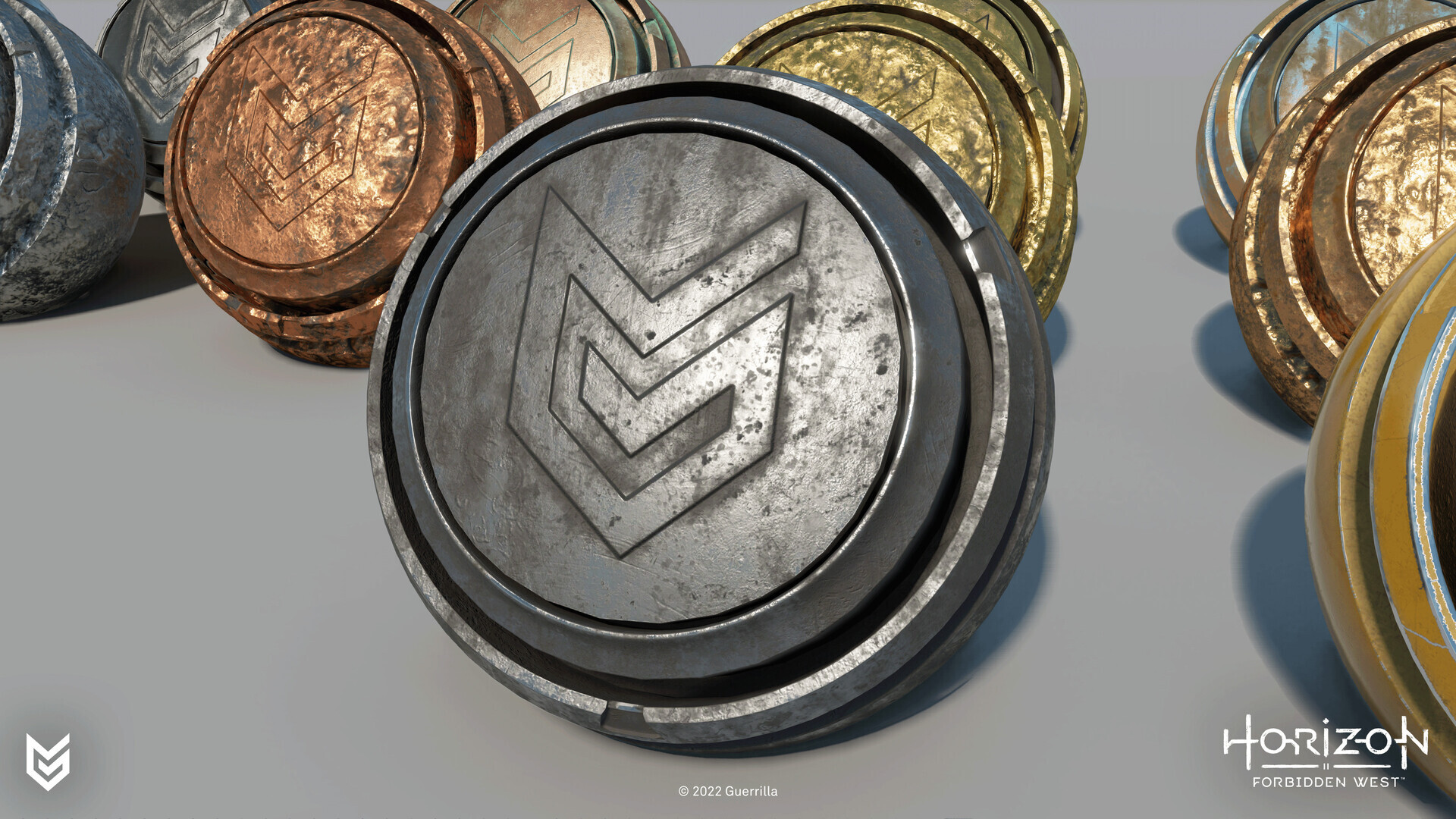
A pure material is only the beginning. From each base material I catalog a defined set of variants: worn, roughened, oxidized. Pure copper becomes worn copper becomes oxidized copper - the same logic across every base in the library.
The goal is a controlled vocabulary. When an artist needs a weathered version of something, the answer is already there. And because each variant is defined in relation to the base, blending between a pristine and a worn state is clean and controllable.
Library Structure & Organization
Naming conventions sound trivial until a library has three hundred entries and nobody can find anything.
In Substance Designer, I keep internal and production-ready materials in the same file but mark the base graphs as Hide in Library - so artists browsing the library never see the intermediate states. Only the final, mixed material is exposed. This prevents anyone from accidentally applying a raw "Copper_Pure" graph directly to an asset.
The folder structure follows two tiers: internal ingredients and exposed, production-ready materials.

Naming follows the convention M_[Material]_[State]_[Variant]:
- Internal bases: [Material]_[State] → Copper_Pure, Copper_Worn, Copper_Oxidized (no prefix - not for direct use)
- Effect nodes: FX_[Effect] → FX_Roughen, FX_Dirt
- Final materials: M_[Material] for the clean base, M_[Material]_[State]_[Variant] for pre-authored wear states → M_Copper, M_Copper_Aged_001, M_Copper_Aged_002, M_Copper_Patina_001
The M_ prefix immediately identifies something as a production-ready material - useful when assets land in Substance Painter or get handed off to external partners. The state name describes the condition rather than the intensity, and the numbered suffix leaves room for multiple variants of the same state without renaming anything later.
The underscore prefix on _Base/ is a deliberate signal: anything in that folder is an ingredient, not a finished product. Together, these conventions ensure that neither internal artists nor external partners accidentally reach for the wrong material/textures.
Effects as Layers
Rather than baking wear or dirt into each material, I build effect nodes - modular layers that sit on top of the base. The base handles accurate, clean values. The effect handles the storytelling.
Pure copper with a roughening effect becomes a more matte, used version. The effect reads mesh data - curvature, ambient occlusion - and adjusts gloss and saturation accordingly. The same effect runs on copper, iron, or steel and produces a contextually appropriate result. Build it once, apply it everywhere.
The final surface is often a blend of several bases combined through masks, grunge maps, or mesh data. The blend logic follows directly from reference - see Day 11 - 💡 Insight - Why Photo Reference Changes Everything. Basing those blend conditions on observed reference produces results that hold up under close inspection.
Performance isn't a concern here. The pure base materials are simple and fast, and compositing them is lightweight - or it can be baked out entirely into textures at the final asset stage. That said, texture resolution is worth keeping in check; more isn't always better, and going overboard adds cost without a visible return.
Real Example / Material Breakdown
Copper is a good example because its aging states are visually distinct and easy to read in render - it moves from warm, high-reflectance metal to dull brown tarnish to blue-green verdigris, with each stage clearly readable at a glance.
Every material starts factory new - Copper_Pure. Before building anything, I study photo reference to understand where the story lives - see Day 11 - 💡 Insight - Why Photo Reference Changes Everything.
From there, Copper_Worn and Copper_Oxidized are cataloged as separate states in the same file, hidden from the library. Copper_Worn shifts gloss downward and pulls the albedo toward a darker, warmer brown. Copper_Oxidized introduces the characteristic blue-green shift - verdigris forming in recesses and sheltered areas first.
To build M_Copper_Aged_001, those bases are blended using:
- A grunge map to break up the transition between clean and worn areas
- Curvature to concentrate wear on raised geometry - edges, ridges, contact points
- Ambient occlusion to push the oxidized state into recesses and cavities where verdigris would naturally collect
The FX_Roughen effect node sits on top, reading the same mesh data to adjust gloss locally. The result is a surface that tells a story: warmer and more reflective where it's been handled, blue-green and rough where it hasn't.
The final output is baked down to a texture set - albedo, roughness, normal - keeping runtime cost flat regardless of how complex the compositing graph is.

Tooling & Pipeline
My tool of choice is Substance Designer. You can build a base material, reference it in a variant, reference that in an effect node, and the whole chain updates when anything upstream changes. The maintenance overhead grows with the library, but the referencing model is what makes this approach practical at scale.
Set up the referencing system cleanly and the mixed materials carry through into Substance Painter as well - consistent values across both authoring packages without any manual syncing.
One decision worth making early is whether to keep materials live as tiling composites or commit to a baked unique texture set. Tiling materials stay flexible - parameters remain adjustable, and the referencing chain updates when anything upstream changes. A baked unique set locks the result but keeps runtime cost flat, removes library dependencies, and is the right call for hero assets where every detail is hand-authored.
A potential option: use tiling library materials for environment fill and repeating surfaces, bake unique sets for characters, props, and anything that needs to respond to LOD budgets individually.
Why This Approach Works
Reusability isn't just a workflow preference - it's a quality guarantee. When everything derives from a shared foundation, new assets automatically sit in the right range and reviews focus on storytelling, not correcting broken base values.
It takes longer to set up. On any project of meaningful scale, the return is significant.
© 2026 Stefan Groenewoud - All views are my own, not those of my employer.